
KH 1171 BREADMAKER - Bread maker BIFINETT - Free user manual and instructions
Find the device manual for free KH 1171 BREADMAKER BIFINETT in PDF.


| Product type | Bread maker |
| Brand | BIFINETT |
| Model | KH 1171 BREADMAKER |
| Dimensions (approx.) | Approximately 30 x 25 x 30 cm (estimate) |
| Weight | Not specified in the manual, approximately 4-6 kg (estimate) |
| Power supply | 220-240 V ~ 50 Hz |
| Power | 850 W |
| Bread weight | 750 g, 1000 g, 1250 g |
| Number of programs | 12 automatic programs |
| Main programs | Regular, French, Whole Wheat, Sweet, Super Rapid, Dough (kneading), Pasta, Buttermilk, Gluten-Free, Cake, Jam, Bake |
| Browning levels | Light, Medium, Dark, Rapid (for programs 1-4) |
| Crust thickness | Adjustable via browning |
| Timer | Yes, delayed start up to 15 hours |
| Keep warm | Up to 60 minutes after baking |
| Memory function | Program resume after power cut up to 10 min |
| Included accessories | 2 kneading paddles, removable baking pan (up to 1250 g), measuring cup, measuring spoon, paddle extractor, recipe booklet, user manual |
| Viewing window | Yes, in the lid |
| Care and cleaning | Clean by hand with a damp cloth; do not immerse the pan; do not use abrasive cleaner |
| Safety | Automatic shut-off, overheat protection, safety lock |
| Warranty | 3 years |
| Customer service | GB DES Ltd (UK) / Irish Connection (IE) |
| Importer | KOMPERNASS GMBH, BURGSTRASSE 21, D-44867 BOCHUM |
Frequently Asked Questions - KH 1171 BREADMAKER BIFINETT
User questions about KH 1171 BREADMAKER BIFINETT
0 question about this device. Answer the ones you know or ask your own.
Ask a new question about this device
Download the instructions for your Bread maker in PDF format for free! Find your manual KH 1171 BREADMAKER - BIFINETT and take your electronic device back in hand. On this page are published all the documents necessary for the use of your device. KH 1171 BREADMAKER by BIFINETT.
USER MANUAL KH 1171 BREADMAKER BIFINETT
| Safety Notices | 2 |
| Appliance Overview | 3 |
| Accessories | 3 |
| Intended Use | 3 |
| Before the first usage | 4 |
| Properties | 4 |
| Control panel | 5 |
| Programme | 6 |
| Timer-Function | 7 |
| Before baking | 8 |
| Baking bread | 8 |
| Error Messages | 10 |
| Cleaning and Care | 10 |
| Technical data | 11 |
| Disposal | 11 |
| Warranty and Service | 11 |
| Importer | 12 |
| Programme sequence | 13 |
| Troubleshooting the Bread Baking Machine | 17 |
Read these operating instructions carefully before using the appliance for the first time and preserve this manual for later reference. Pass this manual on to whoever might acquire the appliance at a future date.
Safety Notices
Please read the operating instructions through completely before using the appliance for the first time!
- Danger of suffocation! Children can suffocate through the improper use of packaging materials. Dispose of them immediately after unpaking or store them in a place that is out of reach of children.
- After unpacking, check the appliance for damage that may have occurred during transportation. If necessary, contact your supplier.
- Place the appliance on a dry, flat and heat-resistant surface.
- Do not place the appliance near inflammable materials or explosive/ignitable gases. A minimum distance of 10cm must be maintained to all other materials.
- Ensure that the ventilation slots of the appliance are kept free at all times. Risk of overheating!
- Before plugging the appliance in, check that the electricity type and mains voltage matches the information given on the type plate.
- Do not place the power cable over sharp edges or close to hot surfaces or objects. These may damage the insulation of the power cable.
- Never leave the appliance unsupervised whilst in use.
- To avoid the risk of tripping accidents the appliance is provided with a short power cable.
Only use the appliance inside buildings.
- Never place the appliance on or close to a gas or electric cooker, a hot oven or any other source of heat. Risk of overheating!
- Never cover the appliance with a tea-towel or other material. Heat and steam must be able to escape. A fire could occur if the appliance is covered with an inflammable material or comes into contact with inflammable materials, e.g. curtains.
If you use an extension cable, ensure that the maximum permitted power rating for the cable corresponds to that of the bread baking machine.
- Place the extension cable in such a way as to prevent anyone from tripping over it or unintentionally pulling on it.
Always check the power cable and plug before use. Should the power cable of the appliance become damaged, to avoid the risk of injury or a fatality it must be replaced by the manufacturer, the manufacturer's customer service or a similarly qualified specialist.
- The use of ancillaries not recommended by the manufacturer could cause damage to the appliance. Only use the appliance for its intended purposes. Non-compliance invalidates all claims under the warranty.
- Start a baking programme only when a baking mould is fitted in. If a mould is not fitted, it could cause irreparable damage to the appliance.
If children are in the vicinity, supervise the appliance particularly well! If the appliance is not in use, and also before cleaning it, remove the plug from the power socket. Allow the appliance to cool down before removing individual parts.
- This appliance is not intended for use by individuals (including children) with restricted physical, physiological or intellectual abilities or deficiencies in experience and/or knowledge unless they are supervised by a person responsible for their safety or receive from this person instruction in how the appliance is to be used. Children should be supervised to ensure that they do not play with the appliance.
- This appliance complies with standard safety regulations. Inspection, repair and technical maintenance may only be performed by a qualified specialist. Non-compliance invalidates all claims under the warranty.
- Do not place any objects on the appliance and do not cover it during operation. Risk of fire!
- Caution! The bread maker becomes very hot during operation. Do not touch the appliance until it has cooled down, or use oven gloves.
- Before taking out or inserting accessories, unplug the power cable and allow the appliance to cool down.
- Do not transport the Bread Baking Machine if the baking mould contains hot or fluid contents, e.g. jams. There is a danger of being burnt!
During use, NEVER come into contact with the rotating kneading paddles. There is also a risk of personal injury! - Do not pull on the cable to remove the plug, rather, pull the plug itself from the socket.
- When not in use, and before cleaning the appliance, remove the power cable from the wall socket.
- Do not use the Bread Baking Machine for the storage of foods or utensils.
- Never lay aluminium foil or other metallic objects in the Bread Baking Machine. This could lead to a short circuit. There would be a risk of fire!
- Never place the bread machine in water or other liquids. Risk of fatal electrical shocks!
- Do not clean the appliance with abrasive sponge cleaning pads. Should particles break away from the sponge and come into contact with electrical components, you could receive an electric shock.
- Do not use an external timing switch or a separate remote control system to operate the appliance.
- Never use the appliance without a baking mould or with an empty one. This would irreparably damage the appliance.
Always close the lid during operation.
NEVER remove the baking mould during operation.
Appliance Overview
Viewing window
2 Appliance lid
3 Ventilation slits
4 Power cable
Control panel

This symbol on the lid of your bread maker warns you about the risk of burns.
Accessories
6 2 kneading paddies
Baking mould for bread weights up to 1250g
Measuring cup
9 Measuring spoon
10 Kneading paddle remover
- Concise instruction sheet
- Recipe book
- Operating manual
Intended Use
Use your Bifinett Bread Baking Machine for baking bread and making jams or marmaldes in domestic areas only.
Do not use the appliance for drying foodstuffs or other objects. Do not use the Bread Baking Machine outdoors.
Use only the ancillaries recommended by the manufacturer. Non-recommended accessories may cause damage to the appliance.
Before the first usage
Disposal of the packaging material
Unpack your appliance and dispose of the packaging material in accordance with your local regulations.
Initial cleaning
Wipe the baking mould 7, kneading paddles 6 and outer surfaces of the bread baking machine with a clean, damp cloth before putting it into operation. Do not use abrasive scrubbers or cleaning powders. Remove the protective foil on the control panel 5.
Pre-heating
Please take note of the following notice regarding the first usage:
For the first heating up ONLY, place the empty baking mould ⑦ into the appliance. Close the appliance lid ②. Select the programme 12, as described in the section "PROGRAMMMES" then press the button Start/Stop B, to warm up the appliance for 5 minutes. To terminate the programme, after 5 minutes press the button Start/Stop B until a long signal tone is heard.
As the heating elements are lightly greased, a slight smell may occur when first putting the appliance into operation. This is harmless and stops after a short time. Provide for sufficient ventilation, for example, open a window.
Allow the appliance to cool down completely and once again wipe the baking mould 7, kneading paddles 6 and the outer surfaces of the Bread Baking Machine with a clean moist cloth.
Risk of fire! Do not allow the Bread Baking Machine to warm up for more than 5 minutes with an empty baking mould. There is a real danger of overheating.
Properties
With this Bread Baking Machine you have the possibility to bake bread according to your taste.
- You can choose from 12 different baking programmes.
- You can employ ready-to-use baking mixtures.
- You can knead dough for buns and noodles and also prepare marmalades and jams.
- With the programme "Gluten Free" you can bake gluten-free baking mixtures and recipes with gluten-free flours, such as cornflour, buckwheat flour and potato starch.
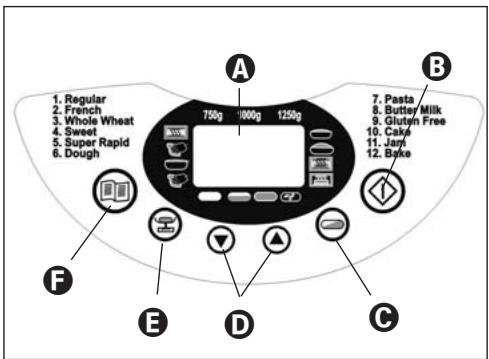
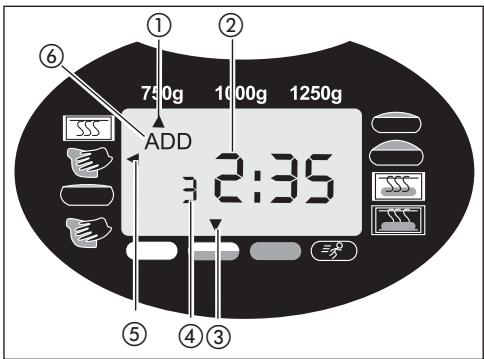
A Display
Display for
① selection of the weight (750 g, 1000 g, 1250 g)
(2) the remaining baking time in minutes and the programmed time
the selected level of browning (light medium, dark Rapid
(4) the selected program number
(5) the programme sequence
(6) the addition of ingredients (,ADD^ )
B Start/Stop
To start and stop an operation or to delete a time-programming.
To interrupt the operation, briefly press the Start/Stop button B until a signal tone sounds and the time in the display A flashes. By once again pressing the Start/Stop button B within 10 minutes, the operation can be continued. Should you forget to re-start the programme, after 10 minutes it will be automatically continued.
To completely terminate the operation or to delete a programming, press the Start/Stop button 8 for 3 seconds, until long signal tone sounds.
Note:
Do not press the Start/Stop button 3 if you want to simply check the condition of the bread. You can watch the baking operation through the viewing window.
Please note:
When pressing all buttons an acoustic signal must be audible, unless the appliance is in operation.
Level of browning (or Rapid modus)

Select the browning level or switch into the Rapid modus (light/medium/dark/Rapid). Press the Browning Level button repeatedly, until the arrow is located above the desired browning level. For the Programmes 1 - 4 you can, through repeated pressing of the Browning Level button , activate the Rapid modus to shorten the baking process. Press the Browning Level button repeatedly until the arrow appears over "Rapid". A browning level cannot be selected with the programmes 6, 7 and 11.
Timer
Time-delayed baking.
Note:
Time-delayed baking cannot be arranged with Programme 11.
Bread weight
Select the bread weight (750 g / 1000 g / 1250 g). Press the button repeatedly until the arrow appears under the desired weight. The weight details (750 g / 1000 g / 1250 g) relate themselves to the amount of ingredients placed in the baking mould ⑦.
A Note:
The default setting when switching the appliance on is 1250g . You cannot adjust the bread weight with the Programmes 6, 7, 11 and 12.
FProgramme selection (Menu)
Call-up of the desired baking programme (1-12). In the display A appears the Programme number and the corresponding baking time.
Memory Function
When being switched on again after a power failure of up to approx. 10 minutes, the program will continue from the same point. This is however not valid when erasing/terminating the baking process or pressing the button Start/Stop B until an extended signal tone sounds.
Viewing window 1
You can observe the baking process through the window 1.
Programme
Select the desired programme with the button Programme selection F. The corresponding programme number is shown in the display A. The baking times are dependant on the selected Programme combinations. See the chapter "Programme sequence".
Programme 1: Regular
For white and mixed breads mainly consisting of wheat flour or rye flour. The bread has a compact consistency. Set the browning of the bread with the button browning level
Programme 2: French
For light breads from well-milled flour. As a rule, the bread is light and has a crispy crust.
Programme 3: Whole Wheat
For breads made from robust flours, e.g. whole wheat flour and whole rye flour. The bread will be more compact and heavy.
Programme 4: Sweet
For breads with ingredients like fruit juices, coconut flakes, raisins, dried fruit, chocolate or additional sugar. Due to an extended rising phase the bread will be lighter and airier.
Programme 5: Super Rapid
Less time is required for kneading, rising and baking. For this Programme, however, use only such recipes that do not contain any heavy ingredients or heavy varieties of flour. Note that in this programme the bread is less aerated and may not be quite so tasty.
Programme 6: Dough (kneading)
For the preparation of yeast dough for buns, pizza or plaits. In this Programme no baking is done.
Programme 7: Pasta
For the preparation of pasta dough. In this Programme no baking is done.
Programme 8:Butter Milk
For breads made with buttermilk or yoghurt.
Programme 9: Gluten Free
For breads made of gluten-free flours and baking mixtures. Gluten-free flours require longer for the absorption of liquids and have differing rising properties.
Programmme 10: Cake
In this programme the ingredients are kneaded, allowed to rise and then baked. Use baking powder for this programme.
Programmme 11: Jam
For making jams, preserves, jellies and fruit spreads.
Programme 12: Bake
For the after-baking of breads that are not brown enough, not baked through or ready-made dough. All kneading and rising processes are dispensed with in this programme. The bread is kept warm for up to one hour after the baking process. This prevents the bread from becoming too moist.
Programme 12 bakes the bread for 60 minutes. To terminate these functions prematurely, press the Start/Stop button until a long signal tone is heard. To switch the appliance off, remove the power plug from the wall socket.
A Note:
With the programmes 1, 2, 3, 4, 5, 6, 8 and 9 a signal tone sounds during the programme process and "ADD" ⑥ appears in the display.
As soon as possible after it sounds add the other ingredients, such as fruit or nuts.
The ingredients will not be crushed by the kneading paddle 6.
If you have set the timer, you can put all the ingredients into the baking mould 7 at the beginning. In this case, however, fruits and nuts should be cut into smaller pieces before inserting them.
Timer-Function
The timer function allows you to do time-delayed baking.
With the arrow buttons and enter in the desired completion time for the baking process.
Warning! Before you bake a particular type of bread with time delay first try out the recipe under observation, to ensure that the relationships of the ingredients to each other are correct, the dough is not too firm or too thin, and that the amounts are not too large and could possibly overflow. Risk of fire!
Select a Programme. The display A indicates the required baking time.
With the arrow key you can postpone the end of the Programme. The first activation pushes the completion time back to the next full interval of 10 minutes. Each subsequent activation of the arrow key pushes the completion time back by 10 minutes. You can accelerate this procedure by holding the button pressed down. The display shows you the whole period of the baking time and delay time. On a possible exceeding of the possible time delay you can correct the time with the arrow button
Confirm the programming of the timer with the Start/Stop button B. The colon on the display A flashes and the programmed time starts to run. When the baking process has been completed, ten acoustic signals are sounded and the display A indicates 0:00.
Example:
It is 8:00 a.m. and you would like to have fresh bread in 7 hours and 30 minutes, in other words at 3:30 p.m.
First of all select Programme 1 and then press the arrow button D until 7:30 appears in the display A, as the time period to be allowed for completion is one of 7 hours and 30 minutes.
Note: The timer function cannot be activated with the Programme "Jam".
Note
With time delayed baking please do not use perish-able ingredients such as milk, eggs, fruit, yoghurt, onions etc.
Before baking
For a successful baking process, please consider the following factors:
Ingredients
Note
Take the baking mould ⑦ out of the housing before putting in the ingredients. Should ingredients drop into the baking area, a fire may be caused by them burning on the heating elements.
Always place ingredients into the baking mould 7 in the sequence specified.
All ingredients should be at room temperature, to ensure an optimal rising result from the yeast.
- Ensure that you measure the ingredients precisely. Even negligible deviations from the quantities specified in the recipe may affect the baking results.
Note
NEVER use quantities larger than those specified. Too much dough could rise out of the baking mould ⑦ drop onto the hot heating elements and cause a fire.
Baking bread
Preparation
Pay heed to the safety instructions in this manual. Place the Bread Baking Machine on a level and firm surface.
- Pull the baking mould ⑦ upwards and out of the appliance.
- Push the kneading paddles 6 onto the drive shafts in the baking mould 7. Make sure they are firmly in place.
- Place the ingredients for your recipe into the baking mould 7 in the specified order. First add the liquids, sugar and salt, then the flour, adding the yeast as the last ingredient.
Note
Ensure that the yeast does not come into contact with salt or fluids.
- Place the baking mould ⑦ back in the appliance. Ensure that it engages correctly.
- Close the appliance lid ②
- Insert the power plug into the wall socket. A signal tone sounds and in the display A appears the Programme number and the time-duration for Programmme 1.
- Select your programme with the Programme select button F. Each input is confirmed with a signal tone.
- If necessary, select the size of bread you want to bake with the button .
- Select the browning level for your bread. In the display A the arrow shows you what you have selected, light, medium or dark. Here you can also select the setting "Rapid" to shorten the time period in which the dough rises.
Note
A browning level cannot be selected with the programmes 6, 7 and 11.
The function "Rapid" is only available with
Programmes 1-4.
A bread weight level cannot be selected with the Programmes 6, 7, 11 and 12.
- You now have the option of setting the end time of your programme using the timer function. You can enter in a maximum time delay of up to 15 hours.
Note
This function is not available for Programmme 11.
Starting the Programme
Now start the programme with the Start/Stop button B.
Note: The Programmes 1, 2, 3, 4, 6, 8 and 9 start with a 10 to 30 minute pre-heat phase (except Rapid, see Table for Programme Sequences). The kneading paddles do not move themselves. That is not an error of the machine.
The Programme automatically carries out the various operations.
You can watch the programme sequence via the window 1 of your Bread Baking Machine. Occasionally, condensation may collect in the window during baking 1. The appliance lid 2 can be opened during the kneading phase.
Note
Do not open the appliance lid 2 during the rising or baking phases. The bread could collapse.
Ending the Programme
When the baking process has been completed, ten acoustic signals are sounded and the display A indicates 0:00.
At the end of the programme the appliance automatically changes to a keep-warm mode for up to 60 minutes.
Note
This is not applicable to Programmes 6, 7 and 11.
In this mode, warm air circulates inside the appliance. The keep warm period can be prematurely terminated by pressing down the Start/Stop button until the signal tone sounds.
Warning
Before opening the appliance lid 2 remove the power plug from the wall socket.
When not in use, the appliance should never be plugged in!
Taking out the bread
When handling the hot baking mould, 7 always use pot holders or oven gloves.
Hold the baking mould ⑦ tilted over a grid and shake it lightly until the bread slides out of the baking mould ⑦.
If the bread does not slip off the kneading paddles 6, carefully remove the kneading paddles 6 using the supplied kneading paddle remover 10.
Note
Do not use any metal objects which may cause scratches on the non-stick coating.
After removing the bread, immediately rinse the baking mould with warm water. This prevents the kneading paddles from sticking to the driving shaft.
Tip: If you remove the kneading paddles 6 after the last kneading of the dough, the bread will remain intact when you remove it from the baking mould 7.
- Briefly press the Start/Stop button B to interrupt the programme at the very start of the baking phase or, remove the power plug from the wall socket. Ensure that you re-insert the power plug within 10 minutes so that the baking process can be continued.
- Open the appliance lid ② and remove the baking mould ⑦. You can take the dough out with floured hands and remove the kneading paddles ⑥.
- Lay the dough back into the baking mould ⑦. Replace the baking mould ⑦ and close the appliance lid ②.
- Insert the power plug into the wall socket. The baking programme continues from where it was stopped.
Allow the bread to cool for 15-30 minutes before eating it.
Before cutting the bread, ensure that the kneading paddles have been removed 6.
Error Messages
- If the display A shows "HHH" after the programme has been started, it indicates that the temperature in the Bread Baking Machine is still too high. Stop the programme and remove the power plug. Open the appliance lid 2 and allow the machine to cool down for 20 minutes before reusing it.
- If a new Programme cannot be started directly after the Bread Baking Machine has completed a baking process, it means the appliance is still too hot. In this case the display panel reverts to the default setting (Programme 1). Open the appliance lid and allow the machine to cool down for 20 minutes before re-using it.
Warning
Do not attempt to take the appliance into use before it has cooled itself down. This functions only with Programmme 12.
- If the display shows "EE0", "EE1" or "LLL" after the programme has been started, first of all switch the Bread Baking Machine off and then back on by removing and then re-inserting the power plug from/into the wall socket. Should the error display continue, make contact with Customer Services.
Cleaning and Care
Warning
Before cleaning it, always remove the power plug from the wall socket and allow the appliance to cool down completely.
Protect the appliance against moisture, this could cause you to receive an electric shock.
Please also observe the safety instructions.
Important
The appliance and its ancillaries are not suitable for being cleaned in a dish washing machine!
Housing, lid, baking space
Remove all particles left behind inside the baking area using a wet cloth or a slightly wet soft sponge. Wipe the housing and the lid too, only with a moist cloth or sponge.
- Ensure that the interior is completely dry. For easier cleaning, the appliance lid ② can be removed from the housing:
- Open the appliance lid ② until the wedge-shaped hinge cam pass through the openings of the hinge guides.
Pull the appliance lid 2 out of the hinge guides.
To reassemble the appliance lid 2, guide the hinge caps through the opening of the hinge guides.
Baking moulds and kneading paddies
The surfaces of the baking moulds 7 and kneading paddles 6 have a non-stick coating. When cleaning the appliance do not use aggressive detergents, cleaning powders or objects that may cause scratches to the surfaces.
Due to moisture and vapours the surfaces of various parts may undergo changes in their appearance over a period of time. This has no influence on the function nor does it reduce the quality of the baking results.
Before cleaning, take the baking moulds 7 and kneading paddies 6 out of the baking area.
Wipe the outside of the baking moulds with a damp cloth.
Important
Never submerse the baking mould 7 in water or other liquids.
Clean the interior areas of the baking mould with warm soapy water.
If the kneading paddies 6 are encrusted and it is difficult to dissolve, fill the baking mould 7 with hot water for approx. 30 minutes.
If the mountings of the kneading paddles 6 are clogged, you can clean them carefully with a wooden toothpick.
Do not use any chemical cleaning agents or solvents to clean the Bread Baking Machine.
Technical data
Model: Bread Baking Machine KH 1171
Nominal voltage: 220-240V\~50Hz
Power consumption: 850 Watt
Disposal

Do not dispose of the appliance in your normal domestic waste. This product is subject to the European guideline 2002/96/EC.
Dispose of the appliance through an approved disposal centre or at your community waste facility. Observe the currently applicable regulations. In case of doubt, please contact your waste disposal centre.

Dispose of all packaging materials in an environmentally friendly manner.
Warranty and Service
The warranty for this appliance is for 3 years from the date of purchase. The appliance has been manufactured with care and meticulously examined before delivery. Please retain your receipt as proof of purchase. In the case of a warranty claim, please make contact by telephone with our service department. Only in this way can a post-free despatch for your goods be assured.
The warranty covers only claims for material and manufacturing defects, not for wearing parts or for damage to fragile components, e.g. buttons or batteries. This product is for private use only and is not intended for commercial use.
The warranty is void in the case of abusive and improper handling, use of force and internal tampering not carried out by our authorized service branch. Your statutory rights are not restricted in any way by this warranty.
GB DES Ltd
Units 14-15
Bilston Industrial Estate
Oxford Street
Bilston
WV147EG
Tel.: 0870/787-6177
Fax: 0870/787-6168
e-mail: support.uk@kompernass.com
IE Irish Connection
Harbour view
Howth
Co. Dublin
Tel: 00353 (0) 87 99 62 077
Fax: 00353 18398056
e-mail: support.ie@kompernass.com
Importer
KOMPERNASS GMBH
BURGSTRASSE 21
D-44867 BOCHUM
www.kompernass.com
Programme sequence
| Programme | 1. Regular | 2. French | ||||||||||
| Level of browning | Light Medium Dark | Rapid | Light Medium Dark | Rapid | ||||||||
| Size | 750 g | 1000 g | 1250 g | 750 g | 1000 g | 1250 g | 750 g | 1000 g | 1250 g | 750 g | 1000 g | 1250 g |
| Time (Hours) | 2:58 | 3:05 | 3:15 | 2:14 | 2:20 | 2:25 | 3:13 | 3:18 | 3:25 | 2:18 | 2:25 | 2:30 |
| Preheat (Min) | 15 | 15 | 20 | N/A | N/A | N/A | 10 | 10 | 15 | N/A | N/A | N/A |
| Kneading 1 (min) | 12 | 13 | 13 | 12 | 13 | 13 | 12 | 12 | 15 | 12 | 13 | 13 |
| Rise 1 (Min) | 25 | 25 | 25 | 10 | 10 | 10 | 20 | 20 | 20 | 10 | 10 | 10 |
| Kneading 2 (min) | 23A*5 | 25A5 | 25A5 | 21A5 | 22A5 | 22A5 | 23A*8 | 25A8 | 25A8 | 21A5 | 22A5 | 22A5 |
| Rise 2 (Min) | 30 | 30 | 30 | 18 | 18 | 18 | 43 | 41 | 35 | 18 | 18 | 18 |
| Rise 3 (Min) | 30 | 30 | 30 | 30 | 30 | 30 | 35 | 35 | 35 | 30 | 30 | 30 |
| Bake (min) | 56 | 60 | 65 | 56 | 60 | 65 | 60 | 65 | 70 | 60 | 65 | 70 |
| Keep-Warm time (Min) | 60 | 60 | 60 | 60 | 60 | 60 | 60 | 60 | 60 | 60 | 60 | 60 |
| Insert ingredients (Time remaining) | 2:01 | 2:05 | 2:10 | 1:49 | 1:53 | 1:58 | 2:26 | 2:29 | 2:28 | 1:53 | 1:58 | 2:03 |
| Pre-adjustment of the time | 15h | 15h | 15h | 15h | 15h | 15h | 15h | 15h | 15h | 15h | 15h | 15h |
- 3A means that the Bread Baking Machine kneads for 3 minutes and simultaneously the signal tone sounds to add ingredients and the display notice "ADD" ⑥ appears.
| Programme | 3. Whole Wheat | 4. Sweet | ||||||||||
| Level of browning | Light Medium Dark | Rapid | Light Medium Dark | Rapid | ||||||||
| Size | 750 g | 1000 g | 1250 g | 750 g | 1000 g | 1250 g | 750 g | 1000 g | 1250 g | 750 g | 1000 g | 1250 g |
| Time (Hours) | 3:18 | 3:25 | 3:35 | 2:24 | 2:30 | 2:35 | 2:56 | 3:01 | 3:10 | 2:10 | 2:16 | 2:20 |
| Preheat (Min) | 15 | 15 | 20 | N/A | N/A | N/A | 10 | 10 | 15 | N/A | N/A | N/A |
| Kneading 1 (min) | 11 | 12 | 12 | 11 | 13 | 13 | 12 | 12 | 12 | 11 | 12 | 12 |
| Rise 1 (Min) | 30 | 30 | 30 | 10 | 10 | 10 | 25 | 25 | 25 | 10 | 10 | 10 |
| Kneading 2 (min) | 23A8 | 25A8 | 25A8 | 22A5 | 22A5 | 22A5 | 24A*6 | 25A6 | 25A6 | 21A6 | 22A6 | 22A6 |
| Rise 2 (Min) | 38 | 38 | 38 | 23 | 23 | 23 | 35 | 35 | 35 | 18 | 18 | 18 |
| Rise 3 (Min) | 35 | 35 | 35 | 35 | 35 | 35 | 30 | 30 | 30 | 30 | 30 | 30 |
| Bake (min) | 56 | 60 | 65 | 56 | 60 | 65 | 52 | 56 | 60 | 52 | 56 | 60 |
| Keep-Warm time (Min) | 60 | 60 | 60 | 60 | 60 | 60 | 60 | 60 | 60 | 60 | 60 | 60 |
| Insert ingredients (Time remaining) | 2:17 | 2:21 | 2:26 | 1:59 | 2:03 | 2:08 | 2:03 | 2:07 | 2:11 | 1:46 | 1:50 | 1:54 |
| Pre-adjustment of the time | 15h | 15h | 15h | 15h | 15h | 15h | 15h | 15h | 15h | 15h | 15h | 15h |
- 4A means that the Bread Baking Machine kneads for 4 minutes and simultaneously the signal tone sounds to add ingredients and the display notice "ADD" ⑥ appears.
| Programme | 5. Super Rapid | 6. Dough | 7. Pasta | 8. Butter Milk | 9. Gluten Free | ||||||
| Level of browning | Light Medium Dark | N/A | N/A | Light Medium Dark | Light Medium Dark | ||||||
| Size | 750 g | 1000 g | 1250 g | N/A | N/A | 750 g | 1000 g | 1250 g | 750 g | 1000 g | 1250 g |
| Time (Hours) | 1:15 | 1:18 | 1:20 | 1:50 | 0:15 | 3:17 | 3:21 | 3:30 | 3:40 | 3:45 | 3:55 |
| Preheat (Min) | N/A | N/A | N/A | 10 | N/A | 25 | 25 | 30 | 15 | 15 | 20 |
| Kneading 1 (min) | 8 | 8 | 8 | 12 | 15 | 10 | 10 | 10 | 12 | 12 | 12 |
| Rise 1 (Min) | N/A | N/A | N/A | 10 | N/A | 20 | 20 | 20 | 20 | 20 | 20 |
| Kneading 2 (min) | N/A 2A 5 | N/A 2A 5 | N/A 2A 5 | N/A 3A 5 | N/A N/A | 2 5A* 8 | 2 5A 8 | 2 5A 8 | 2 3A 8 | 2 3A 8 | 2 3A 8 |
| Rise 2 (Min) | N/A | N/A | N/A | 25 | N/A | 45 | 45 | 45 | 50 | 50 | 50 |
| Rise 3 (Min) | 20 | 20 | 20 | 45 | N/A | 30 | 30 | 30 | 50 | 50 | 50 |
| Bake (min) | 40 | 43 | 45 | N/A | N/A | 52 | 56 | 60 | 60 | 65 | 70 |
| Keep-Warm time (Min) | 60 | 60 | 60 | N/A | N/A | 60 | 60 | 60 | 60 | 60 | 60 |
| Insert ingredients (Time remaining) | 1:05 | 1:08 | 1:10 | 1:15 | N/A | 2:15 | 2:19 | 2:23 | 2:48 | 2:53 | 2:58 |
| Pre-adjustment of the time | 15h | 15h | 15h | 15h | 15h | 15h | 15h | 15h | 15h | 15h | 15h |
- 5A means that the Bread Baking Machine kneads for 5 minutes and simultaneously the signal tone sounds to add ingredients and the display notice "ADD" ⑥ appears.
| Programme | 10. Cake | 11. Jam | 12. Bake | ||
| Level of browning | Light Medium Dark | N/A | Light Medium Dark | ||
| Size | 750 g | 1000 g | 1250 g | N/A | N/A |
| Time (Hours) | 1:30 | 1:35 | 1:40 | 1:20 | 1:00 |
| Preheat (Min) | N/A | N/A | N/A | N/A | N/A |
| Kneading 1 (min) | 15 | 15 | 15 | N/A | N/A |
| Rise 1 (Min) | N/A | N/A | N/A | 15 Heat + kneading | N/A |
| Kneading 2 (min) | N/A | N/A | N/A | N/A | N/A |
| N/A | N/A | N/A | N/A | N/A | |
| N/A | N/A | N/A | N/A | N/A | |
| Rise 2 (Min) | N/A | N/A | N/A | N/A | N/A |
| Rise 3 (Min) | N/A | N/A | N/A | 45 Heat + kneading | N/A |
| Bake (min) | 60 | 65 | 70 | 20 Rise | 60 |
| 15 Rise | 15 Rise | 15 Rise | |||
| Keep-Warm time (Min) | 60 | 60 | 60 | N/A | 60 |
| Insert ingredients (Time remaining) | N/A | N/A | N/A | N/A | N/A |
| Pre-adjustment of the time | 15h | 15h | 15h | N/A | 15h |
Troubleshooting the Bread Baking Machine
| What do I do if the kneading paddle gets stuck in the ⑥ baking mould ⑦ after baking? | Fill the baking mould ⑦ with hot water and twist the kneading paddle ⑥ to loosen the encrustation underneath. |
| What happens if the finished bread is left inside the bread maker? | Through the "Keep-warm function" it is ensured that the bread is kept warm for ca. 1 hour and that it is also protected against moisture. If the bread remains in the baking machine for longer than 1 hour, it may become moist. |
| Are the baking moulds ⑦ suitable for the dishwasher? | No. Please rinse the baking mould ⑦ and kneading paddle ⑥ by hand. |
| Why doesn't the dough get stirred, even if the motor is running? | Check to see if the kneading paddle ⑥ and the baking mould ⑦ have properly engaged. |
| What do I do if the kneading paddle ⑥ gets stuck in the loaf? | Remove the kneading paddle ⑥ with the kneading paddle remover ⑩. |
| What happens if there is a power failure when a Programme is running? | In the case of power failure for up to 10 minutes, the bread maker will complete the last implemented program-me through to the end. |
| How long does it take to bake bread? | Please take note of the exact times given in the table "Programme sequence". |
| What size breads can I bake? | You can bake breads with weights of 750 g - 1000 g - 1250 g. |
| Why can't I use the Timer function while baking with fresh milk? | Fresh products such as milk or eggs spoil if they remain in the appliance for too long. |
| What has happened if the Bread Baking Machine does not work after the Start/Stop button ⑧ has been pressed? | Some baking processes, such as "Warming up" or "Rise" are difficult to recognise. Using the table „Programme sequence“, check which programme section is currently in operation. Check to seeif you have correctly pressed the Start/Stop button ③. Check to see if the power plug is connected to the wall socket. |
| The appliance crushes the added raisins. | To avoid the breaking up of ingredients such as fruit or nuts, add them to the dough after the signal has sounded. |